Join us at the DPSC on Oct 21: https://streamscan.link/DPSC2026
If you are looking to comply with the requirements of CMMC or PCCC, you have likely already heard of Virtual Desktop Infrastructure (VDI).
This technology can allow users to access Controlled Unclassified Information (CUI) without their workstation necessarily being included in the scope of compliance. However, it is not an automatic solution. In fact, its configuration must meet specific conditions for the endpoints using it to be considered out-of-scope.
In this article, we explain how VDI works, what the CMMC guidelines provide, and the conditions that must be met to use this approach in a compliance context.
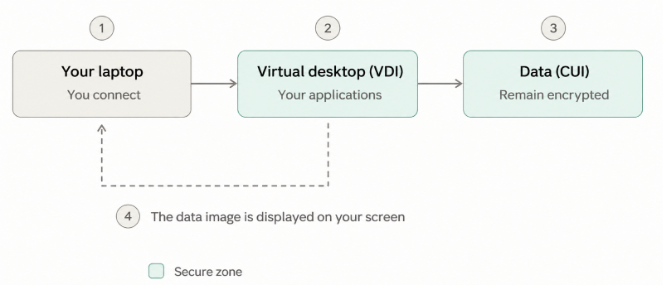
A VDI solution is a platform that allows you, via an intermediary system, to access resources or applications available on systems. The user who wants to access CUI data uses their computer and connects to an intermediary system (the VDI server). Once connected to the VDI, they can launch the application and view the data.
The principle is therefore to separate the physical workstation from the environment in which sensitive data is processed, stored, or transmitted.
The Department of Defense (DoD) CMMC Level 2 Scoping Guide explicitly recognizes that an endpoint using a VDI client can be considered out-of-scope when its configuration prevents the processing, storage, or transmission of CUI on the endpoint itself.
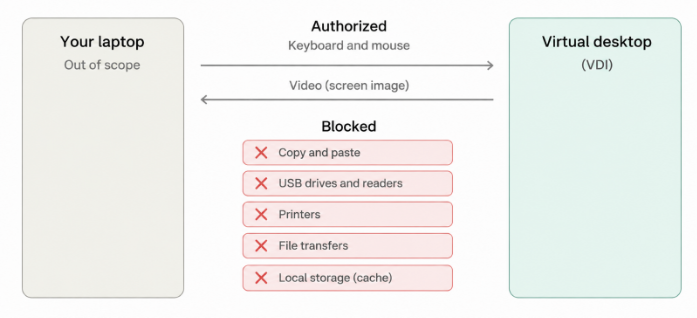
The guide specifically states: “An endpoint running a VDI client configured to prevent the processing, storage, or transmission of Controlled Unclassified Information (CUI), except for keyboard, video, and mouse (KVM) exchanges with the VDI client, is considered out-of-scope.”
In other words, simply using a VDI is not enough. It is the configuration of the VDI and the controls surrounding it that determine whether the endpoint can be considered out-of-scope.
For a workstation using a VDI to be considered out-of-scope, certain conditions must be met. For example:
As you can see, implementing a VDI solution comes with constraints that you must strictly adhere to if you want to be CMMC or PCCC compliant.
The following diagram summarizes the VDI configuration in a CMMC or PCCC context.
When properly configured, VDI can offer several advantages for a CMMC, PCCC, or NIST SP 800-171 compliance project.
VDI can also be considered for certain BYOD (Bring Your Own Device) environments.
A user can access their virtual environment from a personal device without that device directly processing or storing CUI, provided the VDI configuration meets the applicable requirements.
However, this does not mean it is recommended to leave personal devices unprotected. Reducing the scope of compliance does not mean reducing cybersecurity requirements.
VDI also has limitations that must be considered before choosing this approach.
VDI can be particularly relevant when users need to view CUI without the need to download, locally modify, or print it.
For example, an organization that receives CUI from a prime contractor or partner could use a VDI environment that allows its authorized employees to view this information while keeping the data within a controlled environment.
In this type of scenario, limiting local workstation functionality may be acceptable since the primary goal is data access, not local use.
If you need more flexibility or need to print, create, or modify CUI on your computer, you should consider other solutions such as:
Reducing the scope of your CMMC or PCCC compliance does not mean reducing your cybersecurity risks. Even when a VDI solution is properly configured, the workstations used to access CUI can remain exposed to cyber threats. An inadequately protected endpoint can, in particular, become an entry point for an attack and compromise your organization's security.
At StreamScan, our expertise in incident response reminds us of the importance of maintaining robust cybersecurity measures, beyond mere regulatory requirements.
The goal is therefore not only to meet compliance requirements, but to implement an environment that truly protects your data and operations to avoid being notified by the DoD or the Canadian Department of National Defence in the event of an incident affecting their data.
VDI, dedicated enclave, or internal infrastructure: the choice of solution depends on your operational needs, your technological environment, and the requirements your organization must meet.
Are you looking to reduce your CMMC or PCCC scope without compromising your cybersecurity?
StreamScan's experts can assist you in evaluating your environment and identifying an approach tailored to your compliance and security challenges.